

Common Reasons for Slow Support Ticket Resolution You Can't Ignore
April 22, 2026
Chances are you already have the right tools in place to speed up slow support ticket resolution. Maybe you have an Intercom or Zendesk AI chatbot handling routine support queries.
It makes sense, 91% of customer service and support leaders are exploring AI to meet growing executive expectations. However, most teams run into the same common reasons for slow support ticket resolution, and they persist even after investing in AI.
Automation alone doesn’t solve slow ticket resolution.
Lots of people simply struggle with technological problems and need human help. In healthcare, insurance, finance, and high-stakes B2B scenarios, agents need to guide users through intricate workflows, see what's happening on their screens, and make judgment calls that automation just can't handle.
As Kim Hedlin, Gartner's Director Analyst, puts it: “Service organizations are entering a period where AI and human expertise must work in tandem.”
In this article, we'll focus on what automation or AI can't fix. Instead, we'll explore why you should track ticket resolution time, the specific challenges your team is likely facing right now, and how to reduce support ticket volume.
Why is it important to track ticket resolution time?
Ticket resolution time is a critical metric that directly impacts customer satisfaction, retention, and brand loyalty. Monitoring this customer support KPI can reveal specific bottlenecks that slow your team down, and help you improve overall operational efficiency.
According to the HappySignals Global IT Experience Benchmark Report, finance and insurance support teams report the highest happiness score (+87), and notably, their clients feel they lose the least time per incident (1h 34min).
Across industries, resolution speed is shaping customer happiness.
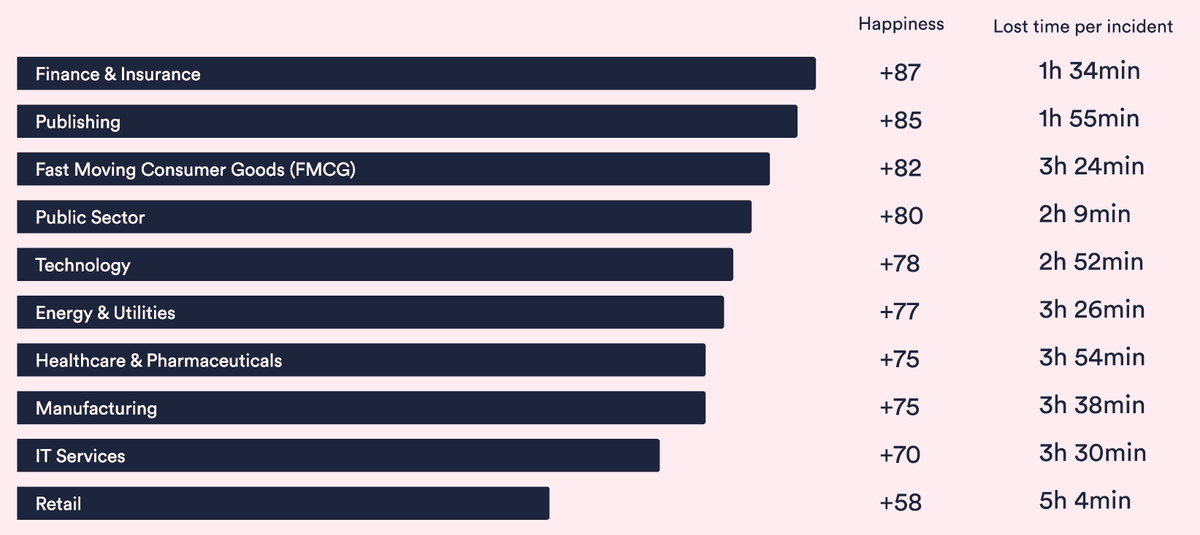
HappySignals also reveals that 13% of support tickets account for 80% of lost agent productivity. This means a relatively small group of time-consuming cases accounts for the greatest burden on your support team.
Understanding which cases fall into this group, and why they take longer, is where improvement begins.
The most common reasons for slow support ticket resolution
1. Communication and visual gaps
When your support team can't see what customers are experiencing, resolution naturally drags out. Without real-time visibility, interactions turn into a game of "ping-pong" with both sides struggling to understand the problem.
You might recognize this if:
- Agents spend significant time asking callers to describe their screens in detail, rather than being able to help directly
- People use different terms for buttons or features, creating confusion about where they are in a workflow
- Bugs seem to disappear when agents try to recreate them because they can't see the exact steps the customer took
- Instructions pile up as agents type out five-step lists that your customer finds overwhelming to follow
Many teams consider screen-sharing software to bridge this gap. While well-intentioned, this approach can introduce its own challenges, which leads us to the next common reason for slow ticket resolution.
2. Technical barriers
For customers who aren't tech-savvy, support interactions can seem intimidating.
Screen-sharing requests or software downloads create additional friction when users are already frustrated. In fact, 41% of customers say they would rather tolerate an issue or solve it themselves than deal with cumbersome processes.
Watch for these patterns:
- Customers encountering obstacles when trying to share screens (corporate firewalls block apps, or they worry about security and file access)
- Agents spending the first 10 minutes of a call helping users join a meeting or troubleshoot their microphone
- Video quality issues preventing agents from seeing important details, like error codes, making troubleshooting ineffective
Cobrowsing is a simpler and safer alternative to traditional screen-sharing software. Customers don't need to download anything or configure settings; they stay right where they are. Your team can assist them in a 5-minute "quick chat."
That speed and simplicity directly impact performance. Enterprises deploying cobrowsing technology in high-friction support channels report 300%-450% ROI within the first 9 months, according to market research by Astute Analytic.
3. Product and industry complexity
We hate to say it, but sometimes it’s your own product that’s the reason for slow support ticket resolution. When software requires constant guidance, the volume of questions naturally strains your team's capacity.
This is especially true for complex tools with steep learning curves, where agents become teachers rather than quick problem-solvers.
And in regulated industries, there's an extra layer: privacy and compliance rules limit visual access to customer screens. In healthcare, for example, you need HIPAA-compliant solutions for any customer interaction tool.
You might experience this when:
- Customers are using customized versions of your software that standard guides don't address
- Even tech-savvy people find your interface overwhelming or non-intuitive
- Users avoid powerful features because they lack clear guidance on how to use them
- Support staff can only provide vague instructions because they can't view screens due to sensitive data
To address the root causes of these tickets, move from reactive troubleshooting to proactive guidance. Well-designed user onboarding prevents them from being created in the first place.
And to help your team provide fast, high-quality assistance without compromising privacy, ensure your tools meet your security and compliance standards, with features like advanced data masking.
4. Insufficient team capacity and tools
Agents face relentless pressure to deliver fast support while managing high volumes of interactions.
At the same time, they rely on tools that either don't meet their needs or are disconnected from one another. This reality forces them to work harder just to keep pace, taking a real toll on their mental health.
You might be experiencing this as:
- High agent turnover, increased sick days, and unnecessary escalations
- Staff time lost switching between disconnected apps
- Consistent Service Level Agreement (SLA) challenges because agents are working without full visibility
- Lower first-contact resolution rates as rushed interactions create repeat callers
There's also an emerging signal worth paying attention to: "Shadow AI." According to Zendesk's 2025 CX Trends Report, unauthorized use of AI tools has surged by 250% annually.
In support contexts, agents might rely on external AI solutions to manage their workload. This clearly indicates that current systems are not meeting their needs.
How to reduce support ticket volume?
The TL;DR. If you want to know how to reduce support ticket volume you need to pinpoint the most common reasons for high ticket volume in your company. Use AI to solve routine questions and reserve your team's expertise for more nuanced cases. Then, equip your agents with cobrowsing software, unified platforms, and knowledge systems that work seamlessly.
Here’s a step-by-step for reducing support ticket volume process:
Step 1: Identify the exact reason for high ticket volume
Look at your ticket data to find the pattern. Which issues are recurring? Are they stemming from unclear features, poor onboarding, or product complexity?
Figure out what’s driving those tickets. Is it preventable volume with questions that shouldn't reach support, or is it unavoidable complexity with tickets that require human judgment? Your data holds the answer.
Step 2: Use AI and automation strategically
Like we said, automation won't solve everything. But that doesn't mean you should ignore it. Letting AI handle routine queries will reduce volume and prevent many common reasons for slow support ticket resolution.
Chatbots can manage routine inquiries, auto-categorization can organize tickets, and knowledge bases can provide instant answers to common questions.
Save your team's expertise for the cases that need it most: complex judgment calls, nuanced conversations, and regulated cases that require human decision-making.
Step 3: Give your team the right tools
If ticket volume is still high after implementing AI and automation, the remaining issue becomes clear. Your team needs the right tools to handle complex cases efficiently without burning out.
Consider these essentials:
- Cobrowsing tools allow agents to see customers' screens and guide them without requiring downloads or complex setup
- Unified support platforms consolidate tickets, customer history, and communication into a single place for better contextual visibility
- Knowledge management systems reduce the time spent hunting for answers across disconnected sources
How UserView helps with faster ticket resolution
UserView is a cobrowsing solution that helps support teams resolve issues as if they were sitting right next to their customers. Agents can use interactive tools like remote control, drawing, and spotlighting to guide users through complex workflows or even to click and type on their behalf.
Here's how co-browsing software tackles the common reasons for slow support ticket resolution:
- Spot the problem instantly. Agents can see customers' screens without asking for screenshots or descriptions.
- Help without barriers. No downloads or installs required, so customers get fast assistance in their browser.
- Protect sensitive data. Guide through sensitive interactions while passwords and credit card details remain hidden.
- Work in your existing tools. Turn troubleshooting marathons into quick chats within Zendesk, Intercom, or Salesforce without losing context.
Stop narrating, start navigating. Book a demo and experience how much faster ticket resolution becomes when you stop asking customers to describe their screens.