

Best live chat for enterprise businesses: A buyer's checklist
August 21, 2026
Enterprise live chat performance varies more than you might think, according to Freshworks' 2025 Customer Service Benchmark.
Two main gaps stand out. The first is resolution time. Out of more than 32,000 teams, the top 20% resolve chat conversations in about two minutes. The median teams take 12 minutes and 42 seconds, while the slowest teams can take over two hours.
The second gap is first-contact resolution. Top teams solve 93% of chats on the first try. The median is 80%, and the lowest group sits at 63%, so over a third of their customers have to come back for help.
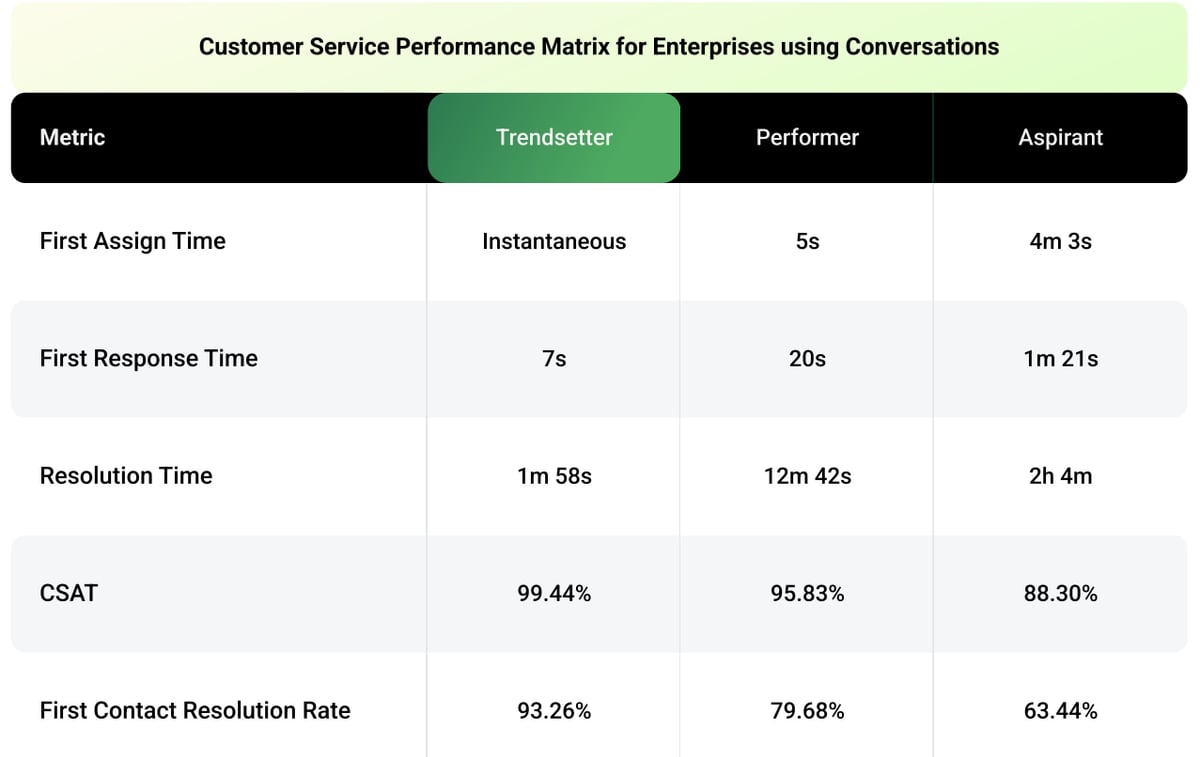
No tool can fix your support operation alone. Training, workflows, and how your team handles escalations determine where in that range your average lands. Even so, your platform is the foundation for everything else. It affects what your agents see, how much information they get before chatting, and whether they can solve complex issues in one conversation.
If you choose the right live chat software, everything you build on top of it compounds. If you choose the wrong one, your team spends time compensating for its weaknesses. However, speed is only half the decision. Your choice also needs to meet security standards, connect with your existing systems, and offer reliable, 24/7 support.
How do you balance all these factors when making your decision? Here's a six-point checklist for choosing the best live chat for enterprise businesses, plus our four favorite platforms to start your shortlist with.
What to look for in an enterprise customer service live chat
1. Enterprise-grade security and compliance
A platform your agents love is worthless if your security team won't approve it, and finding that out late in the process can set you back months. The good news is that top vendors share their security details up front, so you can check most requirements before talking to sales.
Here's what to look for:
- A public trust center: the strongest vendors keep a live page listing certifications, subprocessors, retention periods, and current uptime
- Current certifications: SOC 2 Type II and ISO 27001 are table stakes at this level
- Your industry's standard: healthcare buyers, for example, need HIPAA-compliant solutions and a signed business associate agreement
- Automatic field-level masking and audit trails: agents should never see a card number, a national ID, or a salary field
2. AI and automation capabilities
AI and automation are on every vendor's homepage. But can the technology really deliver? Will it meet your enterprise's needs? You need AI that learns from your data and follows the rules you set.
Push on these:
- Training and learning: how well the AI learns from your existing knowledge base and previous support tickets
- Handoff with context: when the bot escalates, your agent inherits the transcript and customer history instead of starting over
- Guardrails you control: you decide what the AI answers, what it escalates, and which sources it pulls from
- Agent-assist that earns its place: summaries and suggested replies that improve average handle time
3. Ecosystem integration
Whether you pick a full customer service platform with built-in live chat or a separate tool that fits into your help desk, your support tools need to work smoothly with each other.
For example, after a conversation ends, a customer satisfaction survey should start and save the score to the record. And if a customer needs help, your agent should be able to start your cobrowsing tool right from the chat window.
Check for:
- Native and workflow integrations: the tools you already run, supported out of the box rather than through a partner project
- A documented API and webhooks: a way to connect the systems that aren't on the integrations page
- Context flowing both ways: the agent sees account data inside the chat, and the conversation feeds back into the customer record
- One window: every tab switch costs time and loses context
4. Scalability and performance
During peak times like product launches or migration weekends, scalability is non-negotiable. Your platform needs to handle sudden spikes, even if your chat volume triples in a single afternoon.
Everyday performance matters just as much. You want a platform that works the same during busy times and slow periods, so your team never has to plan around it.
Where to press:
- Server uptime commitments in the contract: a published number backed by a service level agreement (SLA), and remedies if the vendor misses it
- Performance under load: response times and message delivery when concurrent sessions spike
- Monitoring and transparency: a public status page and proactive alerts, so your team hears about a problem before your customers do
- Global coverage: data centers and support in the regions where your customers are, so response times don't depend on the time zone
6. User experience and support
Both agents and customers use your enterprise customer service live chat every day. Agents need a workspace that doesn't slow them down, with shortcuts, saved replies, and all the context in one place. Customers need a widget that loads quickly, works on mobile, and meets accessibility standards.
Then there's a third experience: what happens when you need help. You're not just buying software, but also the vendor's support team. Pay attention to how responsive they are during the sales process, as it reflects the help you'll get later.
What to check:
- The agent workspace: put two or three agents on it for a week before you decide
- Mobile and cross-device performance: the widget should behave the same on a phone as on a desktop
- Vendor support: a named success manager and round-the-clock technical coverage
- Onboarding and enablement: whether training, documentation, and admin certification come with the contract or cost extra
No platform is perfect in all six areas. Here are four worth putting through the checklist.
4 best live chat software for enterprise businesses
1. Agentforce Service by Salesforce
Salesforce is one of the most complete tools on this list, offering AI self-service, contact centers, field service, and more. Its live chat is part of Agentforce Service, formerly Service Cloud.
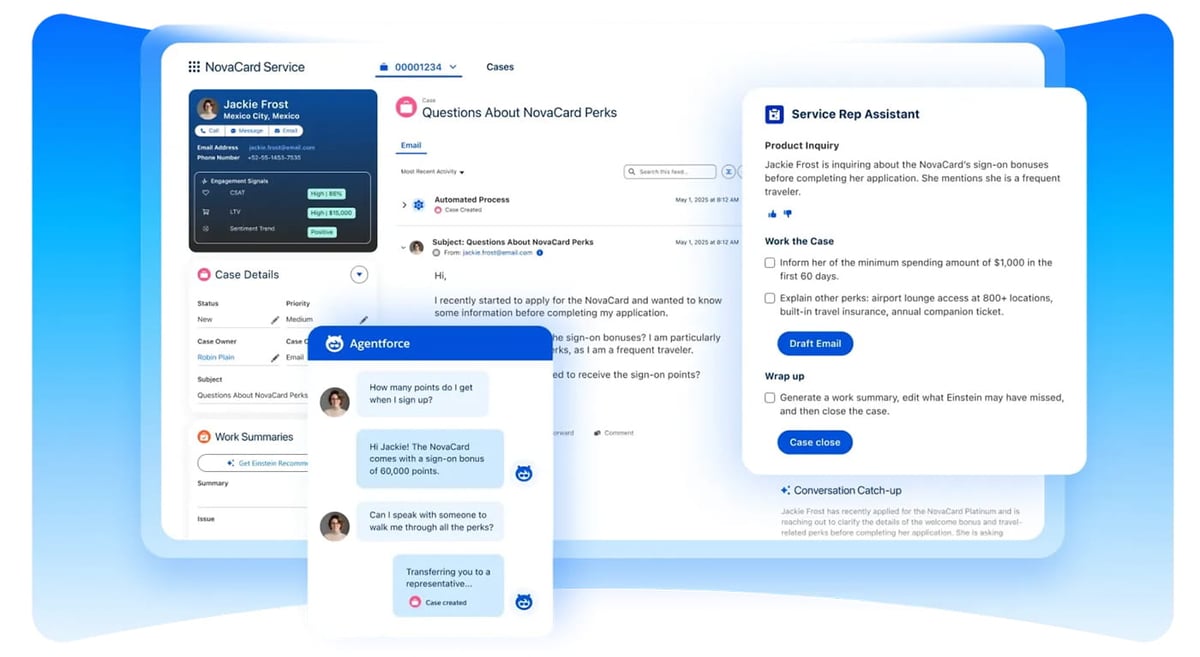
Key Salesforce live chat features:
- Agentforce AI agents: build an agent once and deploy it across any channel, language, or use case, so the logic behind your web chat also runs on WhatsApp or SMS
- Omnichannel routing: work from any channel goes to the right person based on skill set, availability, and capacity, instead of landing in a queue someone triages by hand
- Service Console: agents handle every channel from one workspace, with AI surfacing recommendations, smart replies, and case wrap-ups as the conversation happens
Best for: enterprises that need service tailored to their industry. Salesforce's Industry Clouds come with workflows, data, and tools built for specific industries, such as financial services, healthcare, and high tech.
2. Messaging by Zendesk
Messaging is Zendesk's live chat tool, part of the broader Zendesk Suite and its unified Agent Workspace. It handles both live sessions and slower back-and-forth conversations so that customers can reply at their own pace.
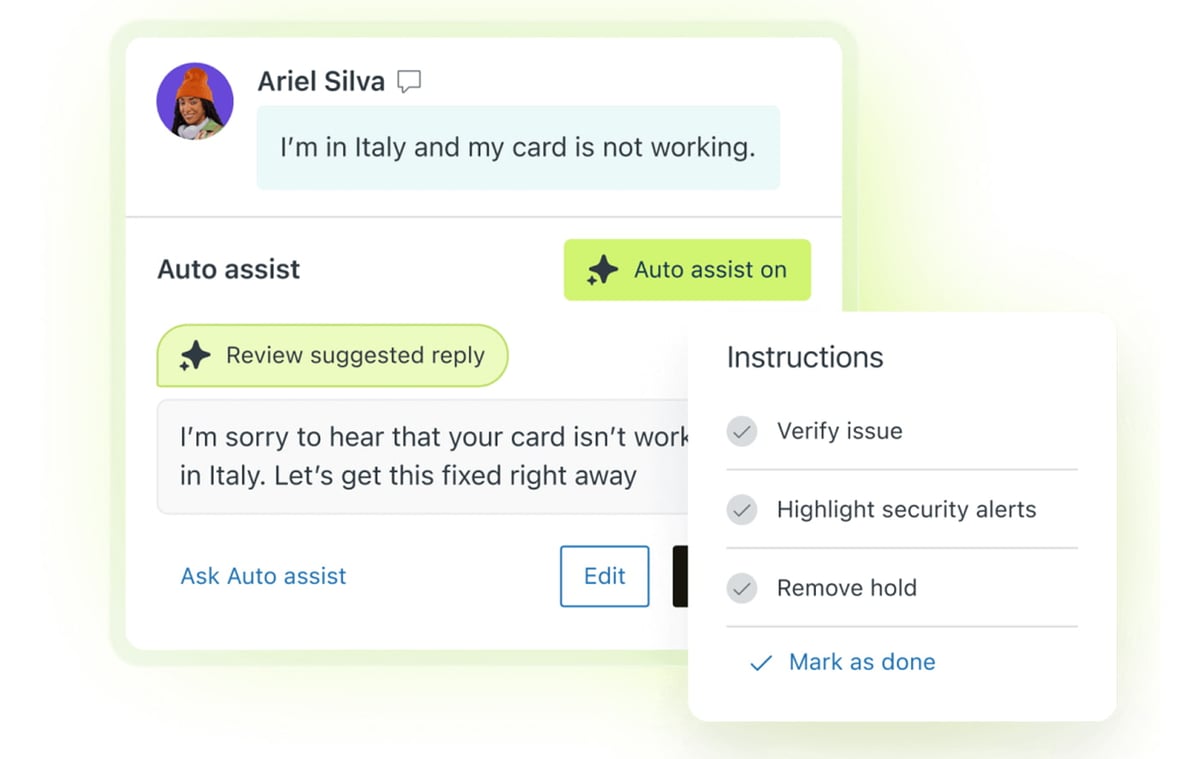
Key Zendesk live chat features:
- AI agents: describe your business procedures in plain language, and the agent handles common issues like refunds and order status on its own
- Copilot: an AI assistant in the agent workspace that suggests next steps, drafts replies, and takes approved actions based on your knowledge base
- Omnichannel routing: conversations reach the right agent automatically, balanced against the email and voice work that agent already has
Best for: enterprises with a complex stack and a demanding security review. Zendesk meets PCI, HIPAA, and GDPR standards, and connects through APIs or no-code tools.
3. Freshchat by Freshworks
Freshworks offers Freshchat, a live chat solution that supports web, mobile app, and messaging channels from a single platform. For integrated ticketing and a knowledge base, you can upgrade to Freshdesk Omni.
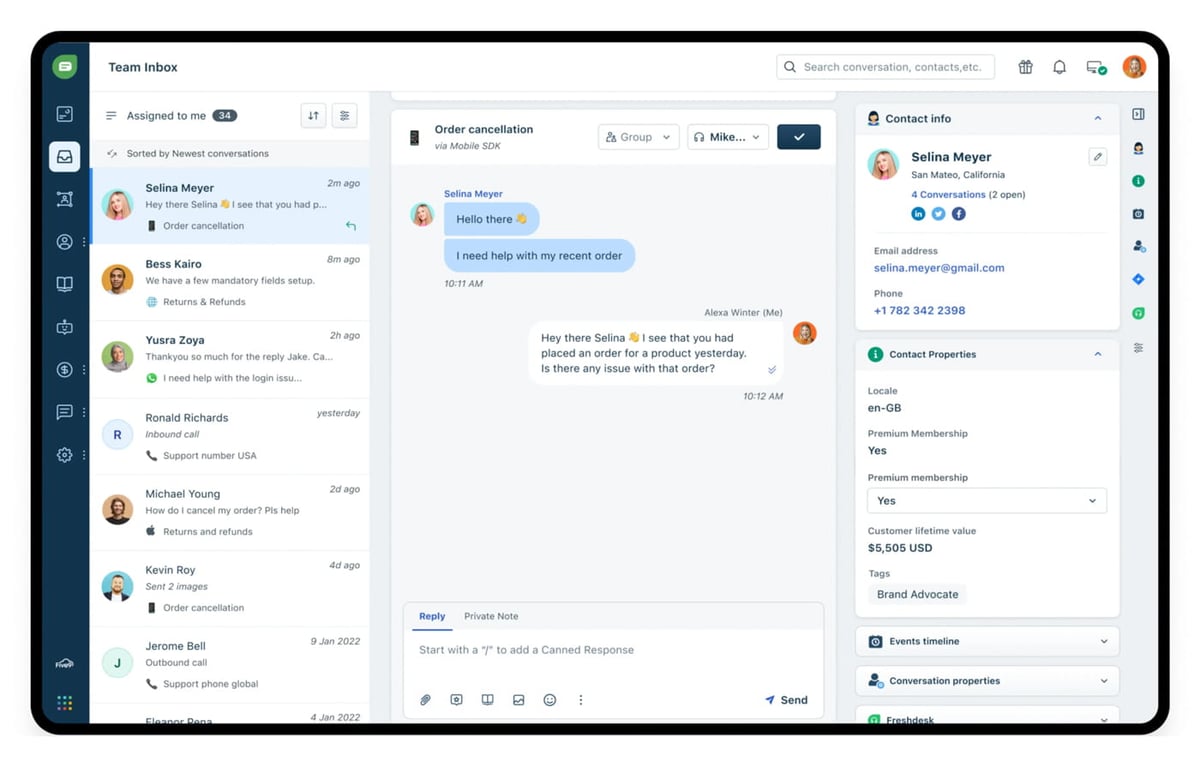
Key Freshchat features:
- Freddy AI agents: no-code bots you deploy across your website, app, and messaging channels, which Freshworks says resolve up to 80% of queries
- Unified agent workspace: agents see past purchases, open issues, and conversations from every channel in one view
- Proactive campaigns: reach customers on web or messaging before they hit a problem, instead of waiting for them to open the widget
Best for: enterprises seeking broad channel coverage with minimal implementation time. The enterprise tier lets you activate new channels and configure channel-specific AI agents, routing, and SLAs as needed.
4. LiveChat
Unlike the other tools on this list, which offer chat as part of a broader suite, LiveChat is a dedicated solution available since 2002. It now works with products for ticketing, chatbots, and knowledge bases from its parent company, Text.
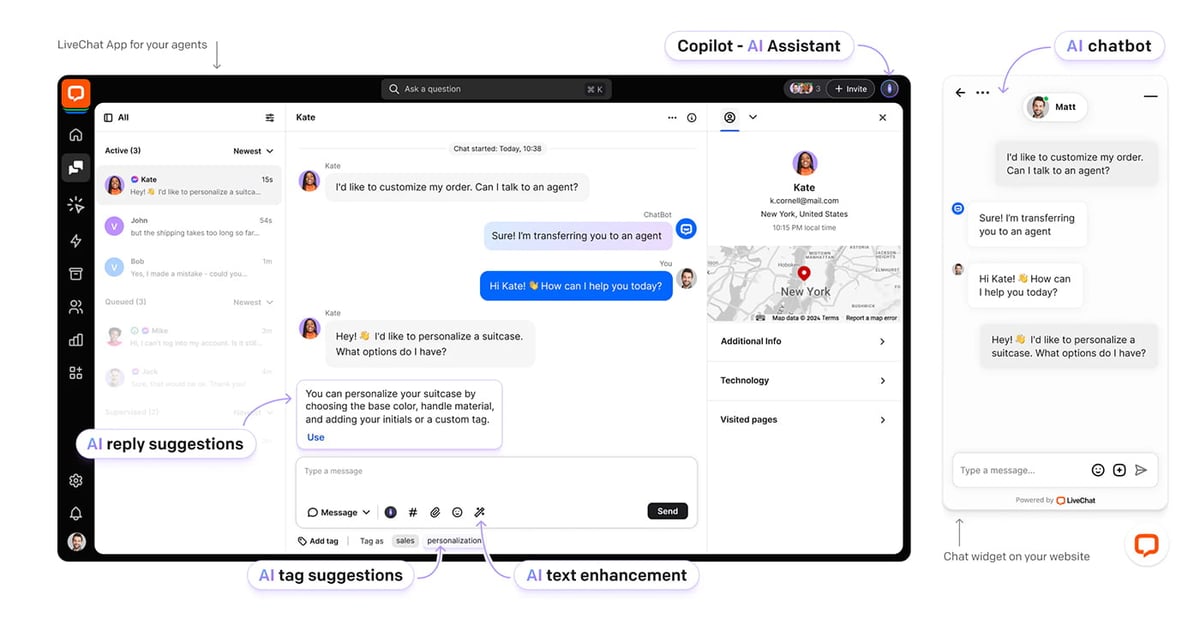
Key LiveChat features:
- AI Agent with skills: create plain-language rules to guide the AI in specific scenarios, such as retrieving live order status or directing chats to the appropriate team
- Agent workflow tools: message sneak peek, canned responses, chat transfers, and group routing to maintain low response times during high volumes
- Reporting out of the box: over 20 pre-built reports on channel performance, agent responsiveness, and customer engagement, without the need for an analyst
Best for: enterprises that need a dedicated, high-quality chat channel rather than a full platform migration. The enterprise tier adds a dedicated account manager, custom onboarding, round-the-clock technical support, and a guaranteed uptime SLA.
The visual layer: How cobrowsing shortens your hardest conversations
Two minutes, 12 minutes, or even two hours: there isn't just one reason why resolution times vary this much across the 32,000 teams Freshworks surveyed. From disconnected tools that force agents to hunt for context across apps, to complex products that turn every ticket into a teaching session, the causes stack up.
Still, one common problem is often missed: agents can't see what the customer sees, so much of the conversation is spent asking the customer to describe their screen.
Screensharing solutions might seem like an easy fix, but they create new hurdles. Customers have to accept a link, install software, and share a full desktop that may have private files open. Even then, agents are stuck watching a blurry video feed, narrating every move instead of truly helping.
Cobrowsing reimagines what visual support looks like. In just seconds, your agent steps into the customer's browser tab, seeing exactly what they see in crisp detail. Live chat becomes a hands-on, guided session, and agents never have to leave their workspace.
For enterprises, UserView cobrowsing offers:
- Security that survives the review: end-to-end encryption, SOC 2 compliance, and audit logs, with passwords, credit card fields, and SSNs automatically masked before they ever reach our servers
- In-session tools your agents will use: remote control, a pen tool for highlighting, multi-agent sessions for specialist input, browser-based audio, and session transfers that keep the customer connected
- Integrations with the platforms you've seen here: start a session from the live chat window and see what the customer was doing before they reached out
- Implementation measured in minutes: paste one JavaScript snippet, configure permissions and masking rules, and go, with a two-week trial on full feature access
- A cobrowsing API for deeper builds: JavaScript and native mobile SDKs to control session triggers, consent flows, masking logic, and event hooks, plus white-label options
The best live chat for enterprise businesses gives your agents context. Cobrowsing gives them the full picture. Book a UserView demo and find out which of your longest conversations were visibility problems all along.
About the Author
Claudia Nobauer
Claudia is a marketing strategist at UserView and loves business strategy, customer experience and communication.