

The 6 Best Live Chat Platforms for SaaS Businesses
July 10, 2026
Every live chat platform has two versions. There's the one on the website, with polished screenshots and impressive metrics. Then there's the one that shows up in G2 reviews, customer stories, and the occasional brutally honest Reddit thread.
When searching for the best live chat platform for your business, demos, free trials, and product tours are worth your time, but always chase down the reviews before committing to a platform.
The stakes justify the effort. B2B SaaS companies earning $3 to $5 million a year spend a median of 10% of revenue on customer support and success, which is on par with the 10% that goes into marketing.
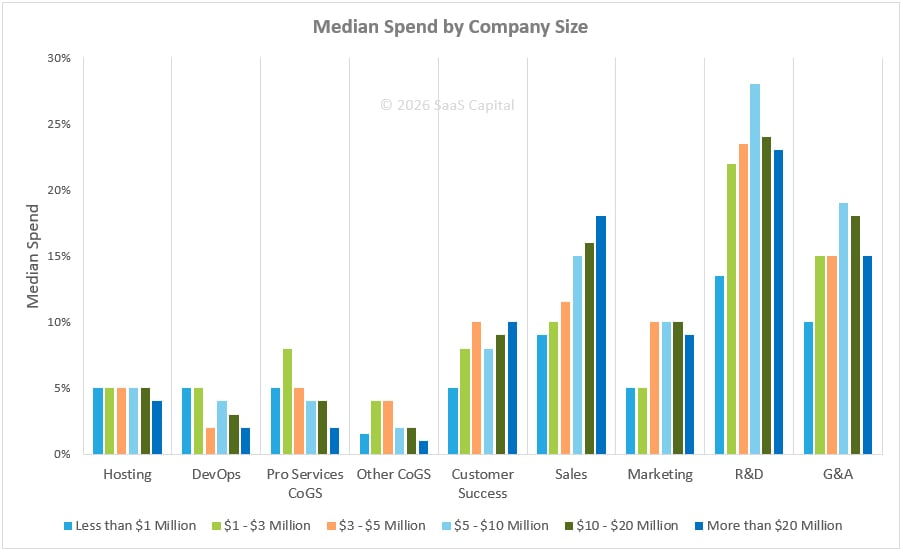
Live chat solutions for your SaaS support team play a central role in your overall customer success investment. A decision that affects this much of your annual budget deserves an afternoon of careful research.
We’ve rounded up the best live chat platforms for your SaaS business, plus a few good rollout practices. But first, a quick look at what live chat can actually do to help your customer success team.
Common use cases for live chat solutions for SaaS
In SaaS, live chat pulls double duty: winning deals and saving customers. Usually in moments like these:
- Pre-sales questions: Someone comparing your plans doesn't want to book a demo for one pricing question. Live chat catches them while they're still interested.
- Onboarding guidance: The first two weeks decide whether a new customer settles in or gives up. A chat widget becomes their lifeline the moment setup gets confusing.
- Billing and account changes: Upgrades, seat changes, and invoice questions are quick to answer but painful to push through email. In chat, they take minutes.
- Technical troubleshooting: Error messages, broken connections, things that worked yesterday and don't today. Live chat easily handles the quick fixes.
- Proactive outreach: Some customers get stuck on an important screen and never ask for help. A well-timed message reaches them before they give up.
- Most of these are simple conversations: the customer asks, you answer, and everyone moves on. Web chat was built for exactly this.
- Each conversation splits into two paths: problems customers can solve themselves, and problems that need a human.
Take Electronic Health Record (EHR) software. Someone asking how to update the clinic's letterhead gets an instant answer from the AI bot. A clinician who can't open a patient record four minutes before an appointment needs a human, immediately. A great live chat setup handles both.
But even the best live chat platform for your SaaS business has limits: some conversations outgrow messaging entirely, especially in support.
Picture a loan applicant stuck on the income verification step. The applicant is one confusing upload away from abandoning the application process entirely. Resolving the applicant’s concern likely means a quick call or a cobrowsing session, where the agent sees the applicant's screen and points at the exact field causing trouble.
Speaking with a human is not a failure of the channel; live chat is where everything starts.
The six best live chat platforms for SaaS businesses
Here are the most recommended live chat platforms for SaaS businesses. For each one, you'll find who it fits best, the key industries it serves, a note on its customer cases, and its G2 rating.
1. LiveChat
LiveChat is what it says on the tin: a dedicated chat tool with the conversation at the center, rather than chat bolted onto a bigger help desk. Agents handle multiple conversations from a single app, backed by a Copilot AI assistant, chatbot automation, and reporting.
- Best for: small to mid-size SaaS support operations that want a dedicated, polished chat tool without adopting a whole suite
- Key industries: software and IT, finance, ecommerce, and education
- Customer cases: a broad library with a healthy number of software companies in it, worth filtering for your vertical
- G2 rating: 4.5 out of 5
2. Freshchat
Freshchat is Freshworks' messaging platform, built around Freddy, the AI agent that greets your customers, answers routine questions straight from your help articles, and hands off to a human when the conversation needs one.
- Best for: teams drowning in repetitive questions that want strong AI deflection with room to grow into the Freshworks suite
- Key industries: SaaS and technology, financial services, healthcare, and travel
- Customer cases: the standout is Klarna, running millions of daily interactions with a 60-second first-response target, proving Freshchat holds up under serious volume
- G2 rating: 4.4 out of 5
3. Zendesk
Zendesk is the platform your shortlist probably started with, and for good reason: chat, ticketing, voice, and a help center in one workspace, with an integration ecosystem that no other platform on this list matches.
- Best for: mid-size to enterprise SaaS support operations that need chat inside a full omnichannel suite
- Key industries: software and technology, financial services, healthcare, retail, manufacturing, and education
- Customer cases: the deepest library, over 400 stories filterable by industry and company size, including plenty of big SaaS names
- G2 rating: 4.3 out of 5
4. Tawk.to
Tawk.to's headline is the price: the core product is free, with unlimited agents, chat history, ticketing, a knowledge base, and a basic Customer Relationship Management (CRM) included. The business model relies on paid add-ons such as removing Tawk.to branding, AI Assist, and video calling.
- Best for: SaaS support operations on a tight budget that need capable chat now and can live with the branding until they pay to remove it
- Key industries: no vertical focus; it markets broadly to small businesses of every kind
- Customer cases: no formal case studies compared to everyone else here, so lean harder on reviews for this one
- G2 rating: 4.5 out of 5
5. Help Scout
Help Scout approaches support from the opposite direction of most tools here: it starts with the shared inbox and human conversation, then adds chat via Beacon, its embeddable widget that combines live chat, help docs, and AI-assisted answers.
- Best for: small to mid-size SaaS support operations that want a human-centered help desk with chat built in
- Key industries: software and SaaS, ecommerce, education, and nonprofits
- Customer cases: heavy on SaaS names like Vimeo, Buffer, Mixmax, and OnePageCRM
- G2 rating: 4.4 out of 5
6. Olark
Olark is the simplest tool on this list, with chat, saved replies, basic automation, and transcripts. It's also one of the few chat tools that treats accessibility as a core feature rather than a checkbox, which matters if your customers or agents rely on assistive technology.
- Best for: small SaaS support operations that want dependable, no-drama chat and nothing else
- Key industries: B2B software, healthcare, government, higher education
- Customer cases: smaller library, notably strong in education and public-sector examples
- G2 rating: 4.3 out of 5
Best practices for live chat integration in SaaS
Get these best practices right once you’ve picked your live chat platform, and your customer success metrics will move in the right direction from day one.
1. Add live chat where your customers get stuck
The default move is to drop the widget on every page and call it done. But live chat earns its keep inside the product: on the settings screen nobody understands, the billing page, or the third step of your onboarding flow. Place your live chat deliberately, check where users drop off, make sure the widget is visible on those screens, and trigger a proactive message when a visitor stalls.
2. Decide where AI ends and your agents begin
AI automation dominates the conversation around the best live chat platforms for SaaS businesses. But the experience changes quickly when a frustrated customer gets trapped in a bot loop with no way out.
The line between what AI handles and what humans handle shouldn't be something your customers discover by accident. Let AI own the questions your help articles already answer well, and ensure the path to a human is visible in every conversation.
3. Keep context attached to every conversation
Nothing burns trust like repeating your problem to a bot, then an agent, then another agent. It tells the customer nobody's talking to each other on your end.
Connect chat to your CRM system and help desk from day one. Whoever answers should already see the plan, the history, and the last ticket, so no one needs to ask the customer to start over.
4. Check what your chat tool can't do on its own
Every platform on this list covers the basics, like a CRM sync, a help desk connection, and a Slack alert. But you'll likely need additional customer support integrations, depending on how complex your product is and where your customers get stuck.
A screen-sharing alternative, such as cobrowsing, is a prime example. When a customer struggles to explain what they're seeing, your agent can join their browser tab, see the same screen, and scroll, click, or annotate directly on your customer’s screen without ever leaving the chat.
Where live chat ends, cobrowsing begins
Every platform on this list shares the same blind spot: your agent can only work with what the customer can put into words. And your hardest tickets are exactly the ones the customers can’t put into words: the unreproducible error, the setting the customer can’t find, or the form that won't submit.
Cobrowsing removes the guessing. Your agent joins the customer's browser tab in seconds, with no downloads or external links, and works from the same view.
With UserView cobrowsing, your agents can:
- See what the customer sees, with no blurry video or lag
- Click, scroll, and type to help them past tricky spots
- Point and draw on the screen to guide without taking over
- Mask sensitive fields automatically, so patient records and account numbers stay hidden
- Walk customers through setups and new features side by side
UserView integrates with all the platforms on this list, so cobrowsing isn't another tab or another tool to evaluate. It lives inside the live chat you choose for your SaaS, or you can build it directly into your product with our cobrowsing API.
Whichever platform you choose, give your agents eyes to go with it. Book a UserView demo.
About the Author
Claudia Nobauer
Claudia is a marketing strategist at UserView and loves business strategy, customer experience and communication.