
Identifying the Visitor
You'll need to identify users in order to search for them on the UserView application.
Here you can see you're able to search using Jack's email address, this is because the identity has been passed through UserView's code.
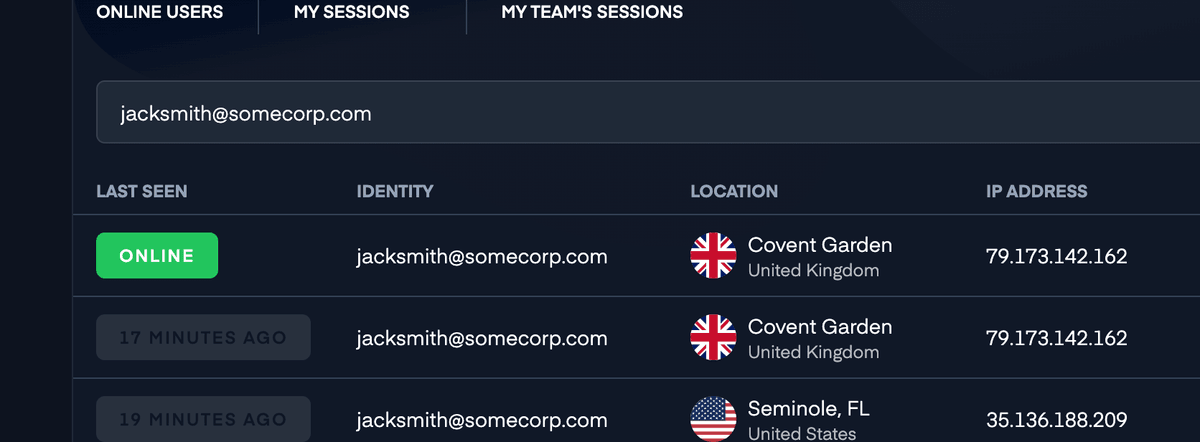
If you'd like to see customer data (email address, name, unique id, etc.) on UserView, there may be some additional steps. If you use Intercom and Zendesk, we try to use their API to automatically display it for you, but if you don't, you'll only be able to see IP addresses.
Identifying Visitors on UserView
There are several ways to identify the visitor on UserView.
Providing Identity Information
You can provide identity information when initializing the SDK or update it later.
At Initialization
Provide the details with the Upscope('init'); function if you have them from your backend:
// Rest of the installation code...
Upscope('init', {
  identities: ['John Smith', 'acme.com'],
  uniqueId: '00032'
});
After Initialization (SPA)
Call Upscope('init'); first, then provide the identity information with Upscope('updateConnection');:
// Rest of the installation code...
Upscope('init');

// getVisitorInfo is a made up function you might have in your code
getVisitorInfo().then(visitor => {
  Upscope('updateConnection', {
    identities: [visitor.name],
    uniqueId: visitor.id
  });
});
With UpscopeProvider Props
Pass identity information directly to the UpscopeProvider:
import { UpscopeProvider } from '@upscopeio/react';

<UpscopeProvider
  apiKey="<public_api_key>"
  enabled={true}
  uniqueId={user.id}
  identities={[user.name, user.email]}
>
  {/* Your application code here */}
</UpscopeProvider>
With the useUpscope Hook
Update identity information dynamically using the hook:
import { useUpscope } from '@upscopeio/react';

function UserProfile() {
  const { Upscope } = useUpscope();

  useEffect(() => {
    if (user) {
      Upscope('updateConnection', {
        identities: [user.name],
        uniqueId: user.id
      });
    }
  }, [user]);

  return <div>{/* ... */}</div>;
}
At Initialization
Provide identity information when initializing the SDK:
let config = UpscopeConfiguration(apiKey: "YOUR_API_KEY")
try Upscope.shared.initialize(with: config)

Upscope.shared.uniqueId = "user-123"
Upscope.shared.identities = ["John Smith", "john@example.com"]
After Initialization
Update identity information using updateConnection():
// After user logs in
Upscope.shared.updateConnection(
    uniqueId: "user-123",
    identities: ["John Smith", "john@example.com"],
    metadata: ["plan": "enterprise"]
)
Clearing Identity
To clear identity on logout:
Upscope.shared.reset()
At Initialization
Provide identity information when initializing the SDK:
val config = UpscopeConfiguration.Builder("YOUR_API_KEY").build()
Upscope.initialize(this, config)

Upscope.uniqueId = "user-123"
Upscope.identities = listOf("John Smith", "john@example.com")
After Initialization
Update identity information using updateConnection():
// After user logs in
Upscope.updateConnection(
    uniqueId = "user-123",
    identities = listOf("John Smith", "john@example.com"),
    metadata = mapOf("plan" to "enterprise")
)
Clearing Identity
To clear identity on logout:
Upscope.reset()
Visitor Information Details
You can provide the following bits of visitor information:
| Key | Type | Description |
|---|---|---|
identities | String[] | An array of strings with whatever identifying information you want to send us. |
uniqueId | String | A string with a unique id of the visitor from your database. This could be the visitor's email address. |
tags | String[], each matching /^#[A-Z-]+$/ | An array of hashtags to filter visitors by. |
integrationIds | String[], each matching /^[a-z]{3,}:.+$/ | An array of strings representing an integration name and an integration id. For example, if your app is called acmechat, and the acmechat ID for the visitor is 123, you could pass ["acmechat:123"]. |
metadata | Object/Dictionary | Custom key-value pairs for additional visitor data. |
Removing Identification
Any piece of identification set to undefined (web) or nil/null (mobile) will be ignored. If you identify visitors on the login page and they navigate to another area that doesn't have identification, we will keep the data we already have.
To explicitly remove any piece of data, set it to null (web) or pass nil/null (mobile). To clear all identification and start fresh, call reset().
Logging the Visitor Out
You can log the visitor out by calling the reset function:
Upscope('reset');
const { reset } = useUpscope();
reset();
Upscope.shared.reset()
Upscope.reset()
This will reset the connection and create a new visitor with a new ID.
Using the Watch Link
The most reliable way to identify a visitor is to use the watch link. This is a unique link to the particular browser or app session the visitor is using, generated for each visitor.
Browser or Visitor?
Although we use the concept of "visitor" throughout the docs, we really mean the visitor's session. If the same person logs in on two different browsers or devices, and you initiate UserView each time with the same uniqueId, you'll end up with two separate visitors in UserView.
Each watch link looks like this: https://upscope.io/w/SHORT_ID.
We automatically add the watch link to most of our built-in integrations, but if you are building your own, you can retrieve the link:
Upscope('getWatchLink', link => {
  console.log(link);
});
const { Upscope } = useUpscope();
Upscope('getWatchLink', link => {
  console.log(link);
});
if let watchLink = Upscope.shared.watchLink {
    print(watchLink)
}
val watchLink = Upscope.watchLink
println(watchLink)
Authentication
The watch link is not meant to be secret. You can freely share it around, as it will still require the agent to authenticate on UserView's dashboard to be used. If you want to use the link without authentication (or without the agent having a UserView account), you'll need to exchange it with a secure one through the REST API.
Getting the Short ID
If you only need the Short ID for an integration:
Upscope('getShortId', shortId => {
  console.log(shortId);
});
const { shortId } = useUpscope();
console.log(shortId);
let shortId = Upscope.shared.shortId
print(shortId ?? "none")
val shortId = Upscope.shortId
println(shortId)
Using the Lookup Code
Learn more about the lookup code on the dedicated page.