
Here are the steps to integrate UserView with Olark:
Add Upscope to instantly view a customer's screen from Olark
As with all live chat integrations, the process of adding Upscope is simple. You don't need to set up and create any special integrations between the two apps, simply paste the Upscope installation code below the Olark code as below.
Example Code:
<!-- BEGIN Olark code -->
<script type="text/javascript" async>
;(function(o,l,a,r,k,y){if(o.olark)return;
r="script";y=l.createElement(r);r=l.getElementsByTagName(r)[0];
y.async=1;y.src="//"+a;r.parentNode.insertBefore(y,r);
y=o.olark=function(){k.s.push(arguments);k.t.push(+new Date)};
y.extend=function(i,j){y("extend",i,j)};
y.identify=function(i){y("identify",k.i=i)};
y.configure=function(i,j){y("configure",i,j);k.c[i]=j};
k=y._={s:[],t:[+new Date],c:{},l:a};
})(window,document,"static.olark.com/jsclient/loader.js");
/* Add configuration calls below this comment */
olark.identify('YOUR_SITE_ID');</script>
<!-- END Olark code -->

<!-- BEGIN Upscope code -->
<script>
// The Upscope code you get at https://upscope.io/install
</script>
<!-- END Upscope code -->
When you open Olark and click on an individual chat, you'll see a screen share link appear on the right-hand side, as below, under Advanced info:
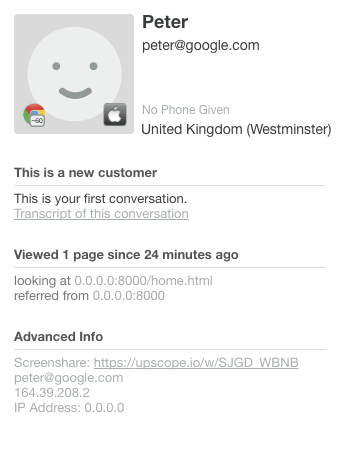
In one click you can see the problem to resolve it faster. No more asking for screenshots or 'what do you see on your screen?'. You're in customer support heaven with Olark and Upscope