
Documentation

Zendesk

Setup

If you have not done so already, create your UserView account on https://userview.com/signup. There's a free trial available. You'll need to install the Upscope JavaScript code first.

Install and Use the Upscope App for Zendesk in 3 Steps

Please note that you must be signed into Zendesk and Upscope as an admin.

  1. In Upscope, go to Settings » Integrations and click on Connect to Zendesk to generate a Token.
  2. Copy that Token and go to the Zendesk Marketplace.
  3. There's an Upscope app for support (tickets) and for chat. Choose the one you use and install the app. Enter the Token when prompted.

Zendesk Messaging

If you have Messaging enabled, you can enable authenticated visitors and set the uniqueId on Upscope:

<script>
  Upscope('updateConnection', {uniqueId: "YOUR_USER_ID"})
</script>

The value for uniqueId must be the same as the one you used for externalId when signing a new JWT token on Zendesk.

Please Note - for Zendesk Support (Tickets)
If you're installing the Upscope app for Zendesk Support, you need to have "Show Lookup Code" enabled in your Upscope co-browsing settings. Go to your settings here and enable it.

Using the App

To confirm that Upscope is installed correctly:

  1. Run a test of the Upscope Zendesk integration by going onto your website and starting a chat.
  2. Within Zendesk, you'll see the Upscope Screen sharing button appear on the right-hand side. Click that to start co-browsing.

You can not only scroll, click, and type for the user but also use the pen tool to draw on or around objects to bring the user's attention to them.

Tip
Please be sure to refresh the page when you've first installed Upscope with Zendesk.

Use the Support Code When Users Phone In

You can also find the user by using their support code when they phone in. The phone support code is a 4-digit unique code which, on entry, leads you to that user's specific screen without them having to start a chat on Zendesk.
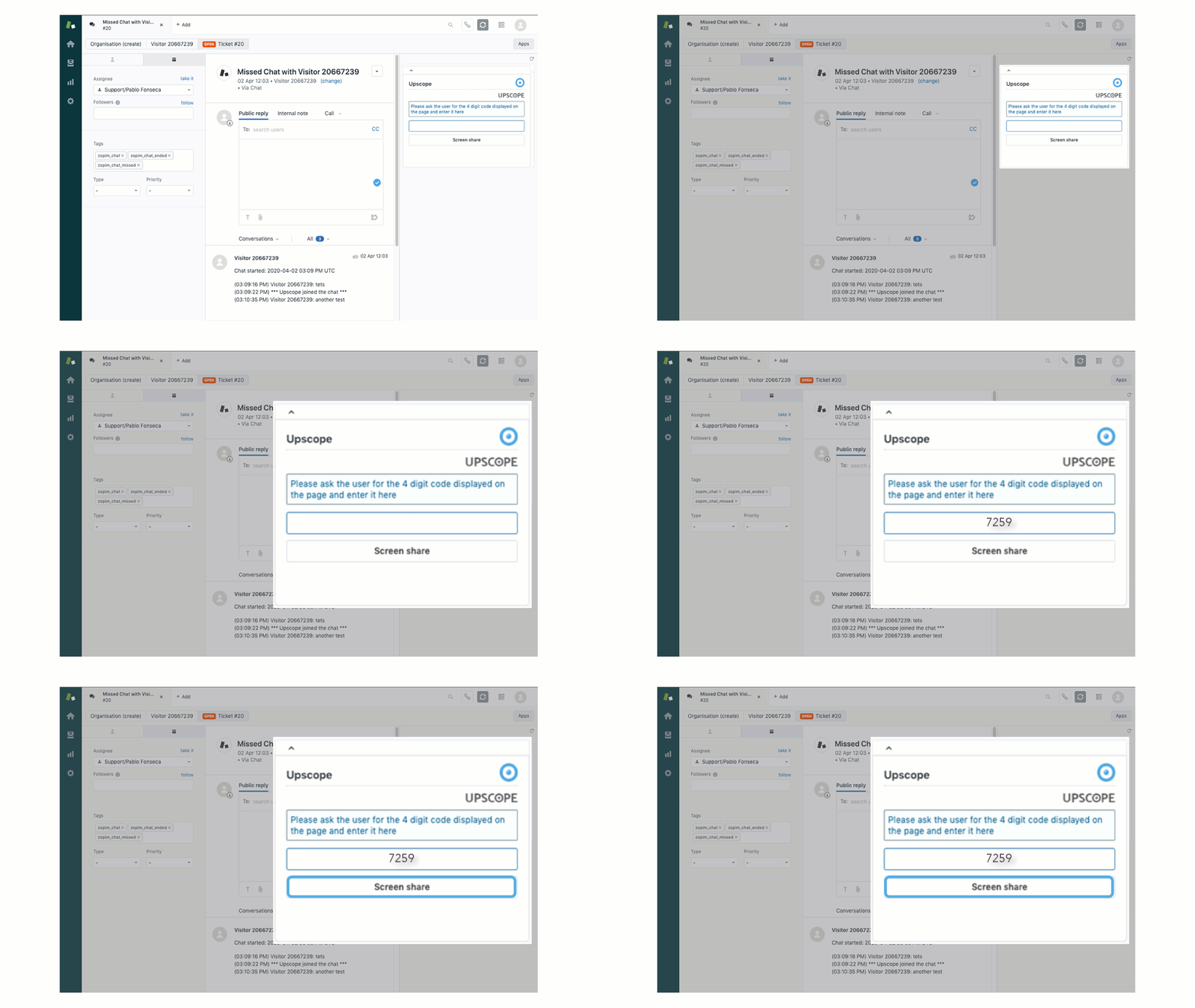
Zendesk Integration Screenshot

  1. Ask for their code (make sure you have it enabled here).
  2. Plug the code into the Upscope widget.
  3. Click the Screen share button.

Depending on your setup, it can either be pulled up by the user pressing control on their keyboard 5 times or it can also be displayed somewhere on the page. Find out more about the support code.

\n"},{"type":"paragraph","id":"p-2","content":"The value for `uniqueId` must be the same as the one you used for `externalId` when signing a new JWT token on Zendesk."},{"type":"callout","id":"please-note-for-zendesk-support-tickets-if-youre-installing-the-upsco","title":"Please Note - for Zendesk Support (Tickets)","content":"If you're installing the Upscope app for Zendesk Support, you need to have \"Show Lookup Code\" enabled in your Upscope co-browsing settings.\n\nGo to your settings [here](https://app.upscope.io/settings/teams/_/search) and enable it.","link":"https://cobrowsingapi.com/docs/integrations/zendesk#setup-install-and-use-the-upscope-app-for-zendesk-in-3-steps-zendesk-messaging::alert::please-note-for-zendesk-support-tickets-if-youre","meta":{"calloutType":"disclaimer"}}]}]}]},{"type":"section","id":"using-the-app","title":"Using the App","level":2,"link":"https://cobrowsingapi.com/docs/integrations/zendesk#using-the-app","children":[{"type":"paragraph","id":"p-0","content":"To confirm that Upscope is installed correctly:"},{"type":"list","id":"list-1","children":[{"type":"list-item","id":"run-a-test-of-the-upscope-zendesk-integration","title":"Run a test of the Upscope Zendesk integration","content":"by going onto your website and starting a chat.","link":"https://cobrowsingapi.com/docs/integrations/zendesk#using-the-app::li::run-a-test-of-the-upscope-zendesk-integration","meta":{"raw":"**Run a test of the Upscope Zendesk integration** by going onto your website and starting a chat."}},{"type":"list-item","id":"within-zendesk-youll-see-the","title":"","content":"Within Zendesk, you'll see the Upscope `Screen sharing` button appear on the right-hand side. Click that to start co-browsing.","link":"https://cobrowsingapi.com/docs/integrations/zendesk#using-the-app::li::within-zendesk-youll-see-the-upscope-screen-sharing","meta":{"raw":"Within Zendesk, you'll see the Upscope `Screen sharing` button appear on the right-hand side. Click that to start co-browsing."}}],"meta":{"ordered":true}},{"type":"paragraph","id":"p-2","content":"You can not only scroll, click, and type for the user but also use the pen tool to draw on or around objects to bring the user's attention to them."},{"type":"callout","id":"tip-please-be-sure-to-refresh-the","title":"Tip","content":"Please be sure to refresh the page when you've first installed Upscope with Zendesk.","link":"https://cobrowsingapi.com/docs/integrations/zendesk#using-the-app::alert::tip-please-be-sure-to-refresh-the-page","meta":{"calloutType":"tip"}}]},{"type":"section","id":"use-the-support-code-when-users-phone-in","title":"Use the Support Code When Users Phone In","level":2,"link":"https://cobrowsingapi.com/docs/integrations/zendesk#use-the-support-code-when-users-phone-in","children":[{"type":"paragraph","id":"p-0","content":"You can also find the user by using their support code when they phone in. The phone support code is a 4-digit unique code which, on entry, leads you to that user's specific screen without them having to start a chat on Zendesk."},{"type":"paragraph","id":"p-1","content":"![Zendesk Integration Screenshot](/docs/assets/integrations/integration_screenshots/zendesk/zendesk_1.gif)"},{"type":"list","id":"list-2","children":[{"type":"list-item","id":"ask-for-their-code-make-sure","title":"","content":"Ask for their code (make sure you have it enabled [here](https://app.upscope.io/settings/teams/_/search)).","link":"https://cobrowsingapi.com/docs/integrations/zendesk#use-the-support-code-when-users-phone-in::li::ask-for-their-code-make-sure-you-have","meta":{"raw":"Ask for their code (make sure you have it enabled [here](https://app.upscope.io/settings/teams/_/search))."}},{"type":"list-item","id":"plug-the-code-into-the-upscope","title":"","content":"Plug the code into the Upscope widget.","link":"https://cobrowsingapi.com/docs/integrations/zendesk#use-the-support-code-when-users-phone-in::li::plug-the-code-into-the-upscope-widget","meta":{"raw":"Plug the code into the Upscope widget."}},{"type":"list-item","id":"click-the-screen-share-butto","title":"","content":"Click the `Screen share` button.","link":"https://cobrowsingapi.com/docs/integrations/zendesk#use-the-support-code-when-users-phone-in::li::click-the-screen-share-button","meta":{"raw":"Click the `Screen share` button."}}],"meta":{"ordered":true}},{"type":"paragraph","id":"p-3","content":"*Depending on your setup, it can either be pulled up by the user pressing `control` on their keyboard 5 times or it can also be displayed somewhere on the page.* Find out more about the support code."}]}]},"https://cms-cdn.userview.com/www/data/docs-index-mkzu47n2-bf54438a.json":[{"slug":"getting-started/implementation-overview","title":"Implementation Overview","order":1,"categoryOrder":0,"segmentOrders":[0,1]},{"slug":"getting-started/invite-team","title":"Invite Your Team","order":2,"categoryOrder":0,"segmentOrders":[0,2]},{"slug":"getting-started/co-browsing-faq","title":"Co-Browsing FAQ","order":3,"categoryOrder":0,"segmentOrders":[0,3]},{"slug":"getting-started","title":"Getting Started","order":999,"categoryOrder":0,"segmentOrders":[0,999]},{"slug":"sdk/web/installation","title":"Installation","order":1,"categoryOrder":1,"segmentOrders":[1,1,1]},{"slug":"sdk/web/configuration-options","title":"Configuration Options","order":2,"categoryOrder":1,"segmentOrders":[1,1,2]},{"slug":"sdk/web/sdk-functions","title":"SDK Functions","order":3,"categoryOrder":1,"segmentOrders":[1,1,3]},{"slug":"sdk/web/listening-for-events","title":"Listening for Events","order":4,"categoryOrder":1,"segmentOrders":[1,1,4]},{"slug":"sdk/web/translations","title":"Multi-Language Support","order":5,"categoryOrder":1,"segmentOrders":[1,1,5]},{"slug":"sdk/web","title":"Web SDK","order":999,"categoryOrder":1,"segmentOrders":[1,1,999]},{"slug":"sdk/ios/installation","title":"Installation","order":1,"categoryOrder":1,"segmentOrders":[1,2,1]},{"slug":"sdk/ios/configuration-options","title":"Configuration Options","order":2,"categoryOrder":1,"segmentOrders":[1,2,2]},{"slug":"sdk/ios/sdk-functions","title":"SDK Functions","order":3,"categoryOrder":1,"segmentOrders":[1,2,3]},{"slug":"sdk/ios/listening-for-events","title":"Listening for Events","order":4,"categoryOrder":1,"segmentOrders":[1,2,4]},{"slug":"sdk/ios","title":"iOS SDK","order":999,"categoryOrder":1,"segmentOrders":[1,2,999]},{"slug":"sdk/android/installation","title":"Installation","order":1,"categoryOrder":1,"segmentOrders":[1,3,1]},{"slug":"sdk/android/configuration-options","title":"Configuration Options","order":2,"categoryOrder":1,"segmentOrders":[1,3,2]},{"slug":"sdk/android/sdk-functions","title":"SDK Functions","order":3,"categoryOrder":1,"segmentOrders":[1,3,3]},{"slug":"sdk/android/listening-for-events","title":"Listening for Events","order":4,"categoryOrder":1,"segmentOrders":[1,3,4]},{"slug":"sdk/android","title":"Android SDK","order":999,"categoryOrder":1,"segmentOrders":[1,3,999]},{"slug":"sdk/element-masking","title":"Element Masking","order":999,"categoryOrder":1,"segmentOrders":[1,999]},{"slug":"sdk/identifying-the-visitor","title":"Identifying the Visitor","order":999,"categoryOrder":1,"segmentOrders":[1,999]},{"slug":"sdk","title":"SDK Documentation","order":999,"categoryOrder":1,"segmentOrders":[1,999]},{"slug":"sdk/the-lookup-code","title":"The Lookup Code","order":999,"categoryOrder":1,"segmentOrders":[1,999]},{"slug":"setup/connect-saml","title":"How to Connect Your SAML Provider","order":999,"categoryOrder":2,"segmentOrders":[2,999]},{"slug":"setup/crm-embed","title":"Embedding UserView Agent view on Another Page Using an Iframe","order":999,"categoryOrder":2,"segmentOrders":[2,999]},{"slug":"setup","title":"Setup","order":999,"categoryOrder":2,"segmentOrders":[2,999]},{"slug":"setup/integrate-live-chat","title":"Integrate your Live Chat Platform","order":999,"categoryOrder":2,"segmentOrders":[2,999]},{"slug":"setup/on-premise","title":"On-premise","order":999,"categoryOrder":2,"segmentOrders":[2,999]},{"slug":"using-userview/initiate-session/userview-app","title":"UserView App","order":1,"categoryOrder":3,"segmentOrders":[3,1,1]},{"slug":"using-userview/initiate-session/lookup-code","title":"Lookup Code","order":2,"categoryOrder":3,"segmentOrders":[3,1,2]},{"slug":"using-userview/initiate-session/agent-request-button","title":"Request Agent Button","order":3,"categoryOrder":3,"segmentOrders":[3,1,3]},{"slug":"using-userview/initiate-session","title":"Initiating a Session","order":999,"categoryOrder":3,"segmentOrders":[3,1,999]},{"slug":"using-userview/initiate-session/troubleshooting","title":"Troubleshooting","order":999,"categoryOrder":3,"segmentOrders":[3,1,999]},{"slug":"using-userview/userview-session-basics","title":"UserView Session Basics","order":1,"categoryOrder":3,"segmentOrders":[3,1]},{"slug":"using-userview/audio-calls","title":"Browser-to-Browser Audio Calls","order":999,"categoryOrder":3,"segmentOrders":[3,999]},{"slug":"using-userview","title":"Using UserView","order":999,"categoryOrder":3,"segmentOrders":[3,999]},{"slug":"using-userview/multi-agent-session","title":"Multi-Agent Session","order":999,"categoryOrder":3,"segmentOrders":[3,999]},{"slug":"using-userview/picture-in-picture","title":"Picture-in-Picture","order":999,"categoryOrder":3,"segmentOrders":[3,999]},{"slug":"using-userview/session-recording","title":"Session Recording","order":999,"categoryOrder":3,"segmentOrders":[3,999]},{"slug":"integrations/intercom/setup","title":"Setup","order":1,"categoryOrder":999,"segmentOrders":[999,999,1]},{"slug":"integrations/intercom/adding-userview-to-your-intercom","title":"Adding UserView to your Intercom Sidebar","order":2,"categoryOrder":999,"segmentOrders":[999,999,2]},{"slug":"integrations/intercom/user-guide","title":"User Guide","order":3,"categoryOrder":999,"segmentOrders":[999,999,3]},{"slug":"integrations/intercom/troubleshooting","title":"Troubleshooting","order":4,"categoryOrder":999,"segmentOrders":[999,999,4]},{"slug":"customization/custom-request-button","title":"Build Your Own Request Button","order":999,"categoryOrder":999,"segmentOrders":[999,999]},{"slug":"customization","title":"Customization","order":999,"categoryOrder":999,"segmentOrders":[999,999]},{"slug":"integrations/chatra","title":"Chatra","order":999,"categoryOrder":999,"segmentOrders":[999,999]},{"slug":"integrations/drift","title":"Drift","order":999,"categoryOrder":999,"segmentOrders":[999,999]},{"slug":"integrations/freshchat","title":"Freshchat","order":999,"categoryOrder":999,"segmentOrders":[999,999]},{"slug":"integrations/front","title":"Front","order":999,"categoryOrder":999,"segmentOrders":[999,999]},{"slug":"integrations/helpscout","title":"HelpScout","order":999,"categoryOrder":999,"segmentOrders":[999,999]},{"slug":"integrations","title":"Integrations","order":999,"categoryOrder":999,"segmentOrders":[999,999]},{"slug":"integrations/intercom","title":"Intercom","order":999,"categoryOrder":999,"segmentOrders":[999,999,999]},{"slug":"integrations/jivochat","title":"JivoChat","order":999,"categoryOrder":999,"segmentOrders":[999,999]},{"slug":"integrations/livechat","title":"LiveChat","order":999,"categoryOrder":999,"segmentOrders":[999,999]},{"slug":"integrations/olark","title":"Olark","order":999,"categoryOrder":999,"segmentOrders":[999,999]},{"slug":"integrations/reamaze","title":"Re:amaze","order":999,"categoryOrder":999,"segmentOrders":[999,999]},{"slug":"integrations/salesforce","title":"Salesforce","order":999,"categoryOrder":999,"segmentOrders":[999,999,999],"render":false},{"slug":"integrations/salesforce/salesforce-chat","title":"Salesforce Chat","order":999,"categoryOrder":999,"segmentOrders":[999,999,999]},{"slug":"integrations/salesforce/salesforce-crm","title":"Salesforce CRM","order":999,"categoryOrder":999,"segmentOrders":[999,999,999]},{"slug":"integrations/tawkto","title":"Tawk.to","order":999,"categoryOrder":999,"segmentOrders":[999,999]},{"slug":"integrations/tidio","title":"Tidio","order":999,"categoryOrder":999,"segmentOrders":[999,999]},{"slug":"integrations/trengo","title":"Trengo","order":999,"categoryOrder":999,"segmentOrders":[999,999]},{"slug":"integrations/zendesk","title":"Zendesk","order":999,"categoryOrder":999,"segmentOrders":[999,999]}]};